Color E Ink is not new, even though it might feel that way based on how recently Amazon joined in. Smaller e-reader brands had been selling color E Ink devices for years before either Kobo or Amazon released a color e-reader of their own. PocketBook and Onyx Boox both shipped color e-readers back in 2020, using E Ink’s original Kaleido panel. Rakuten Kobo followed several years later, launching its first-ever color e-readers, the Kobo Clara Colour and Kobo Libra Colour, in April 2024. Amazon didn’t launch a color Kindle until that October, making the Kindle Colorsoft one of the last color e-readers from a major manufacturer to reach the market, arriving roughly four years after Kaleido displays first appeared and about six months after Kobo’s own first color devices.
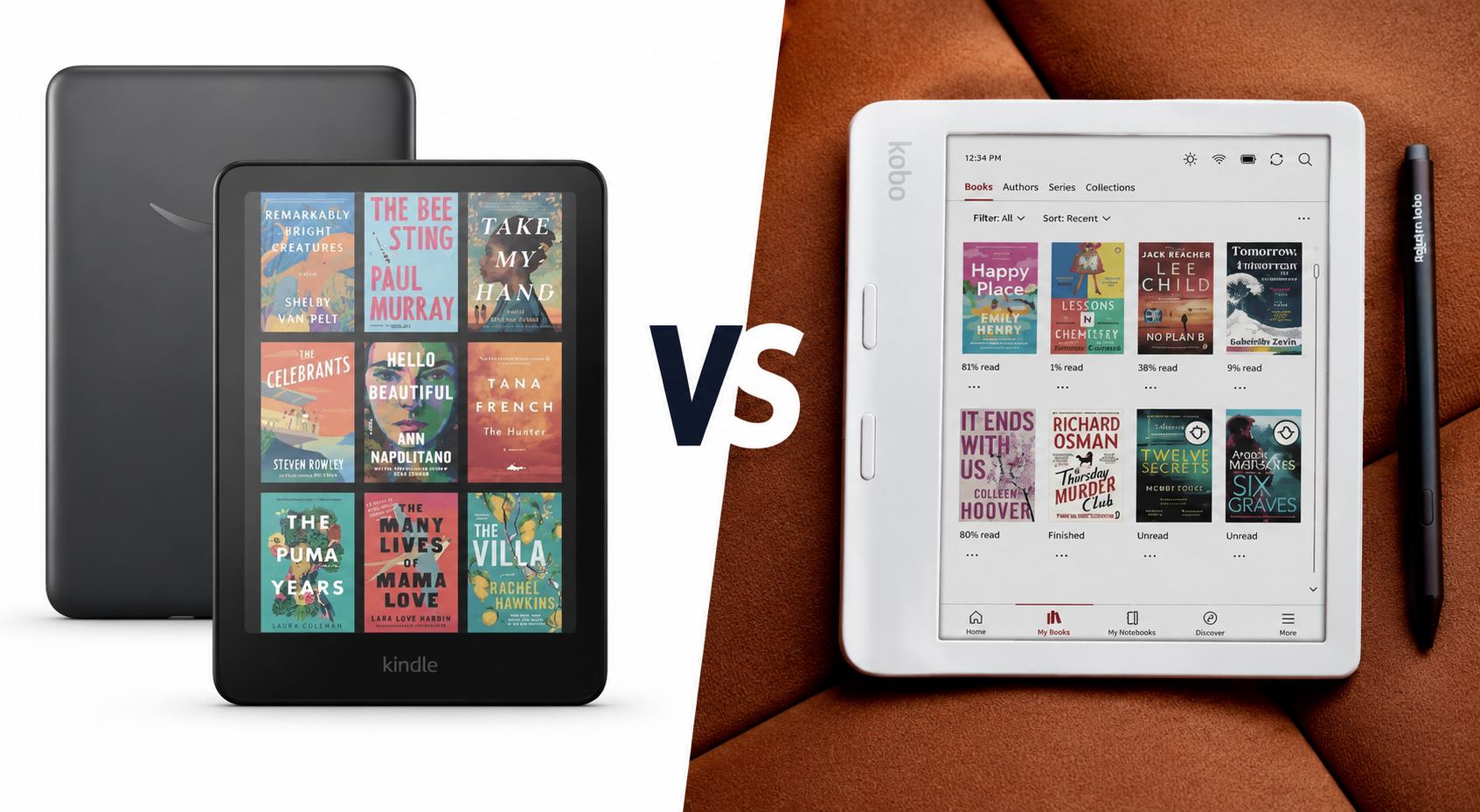
The Kindle Colorsoft and the Kobo Libra Colour are nonetheless the two most talked-about color e-readers today, largely because of the size and reach of the companies behind them. Both bring color book covers, comics, and highlights to a glare-free, paper-like screen. Both are waterproof, both last for weeks on a single charge, and are priced well below a tablet.
They are not the same device, though. The Kindle Colorsoft leans on Amazon’s massive bookstore and simple, screen-only design. The Kobo Libra Colour adds physical page-turn buttons, stylus support, and far more open file compatibility. Picking between them comes down to how someone reads, not just which specs sheet looks better.
This guide – Kindle Colorsoft vs. Kobo Libra Colour – compares both e-readers across every category that matters: display quality, reading experience, comics and manga performance, software, ecosystem, battery life, note-taking, and price. By the end, readers should know exactly which device fits their reading habits, whether they’re deep into the Kindle Store already, tempted by Kobo’s more open platform, or shopping for their first color e-reader entirely.
At a Glance
Both devices share a 7-inch Kaleido 3 display and IPX8 waterproofing, but the details diverge quickly. The table below compares the standard 32 GB configuration of each device, since that is the closest match in storage.
| Spec | Kindle Colorsoft (Signature Edition, 32 GB) | Kobo Libra Colour (32 GB) |
|---|---|---|
| Display | E Ink Kaleido 3, glare-free | E Ink Kaleido 3 with FastGLR, glare-free |
| Screen size | 7 inches | 7 inches |
| Resolution | 1264 x 1680 (300 ppi mono / 150 ppi color) | 1264 x 1680 (300 ppi mono / 150 ppi color) |
| Color technology | Kaleido 3 color filter array (Amazon’s customized display stack) | Kaleido 3 color filter array (standard implementation with FastGLR) |
| Processor | Dual-core 2.0GHz MediaTek, 1 GB RAM | Dual-core 2.0GHz MediaTek MT8113T (ARM A53), 1 GB RAM |
| Storage | 32 GB (16 GB tier also available) | 32 GB standard |
| Waterproofing | IPX8 (2m fresh water, 60 minutes) | IPX8 (2m fresh water, 60 minutes) |
| Battery life | Up to 8 weeks (Amazon’s estimate) | Up to 6 weeks / ~40 days (Kobo’s estimate) |
| Stylus support | None | Kobo Stylus 2 (sold separately) |
| Weight | About 219g | About 199g |
| Dimensions | Roughly 174 x 125 x 7.8mm | 144.6 x 161 x 8.3mm |
| USB-C | Yes | Yes |
| Wireless charging | Yes (Signature Edition only; dock sold separately) | No |
| Price | $279.99 (32GB Signature) / $249.99 (16GB) | $259.99 (frequently discounted to around $229.99) |
| Best suited for | Amazon and Kindle Unlimited households | Buyers who want buttons, a stylus, and open file formats |
| Check Today’s Deal | Click Here | Click Here |
Key Takeaway: Prices on both devices move around constantly with sales events, so treat the numbers above as a snapshot rather than a fixed rule. As of mid-2026, the gap between the two devices has narrowed considerably. Kobo raised the Libra Colour’s price twice since its 2024 launch, and it now costs about the same as, or slightly more than, the base Kindle Colorsoft.
Design and Build Quality
The Kindle Colorsoft and the Kobo Libra Colour take two different approaches to what a color e-reader should look and feel like.
Kindle Colorsoft
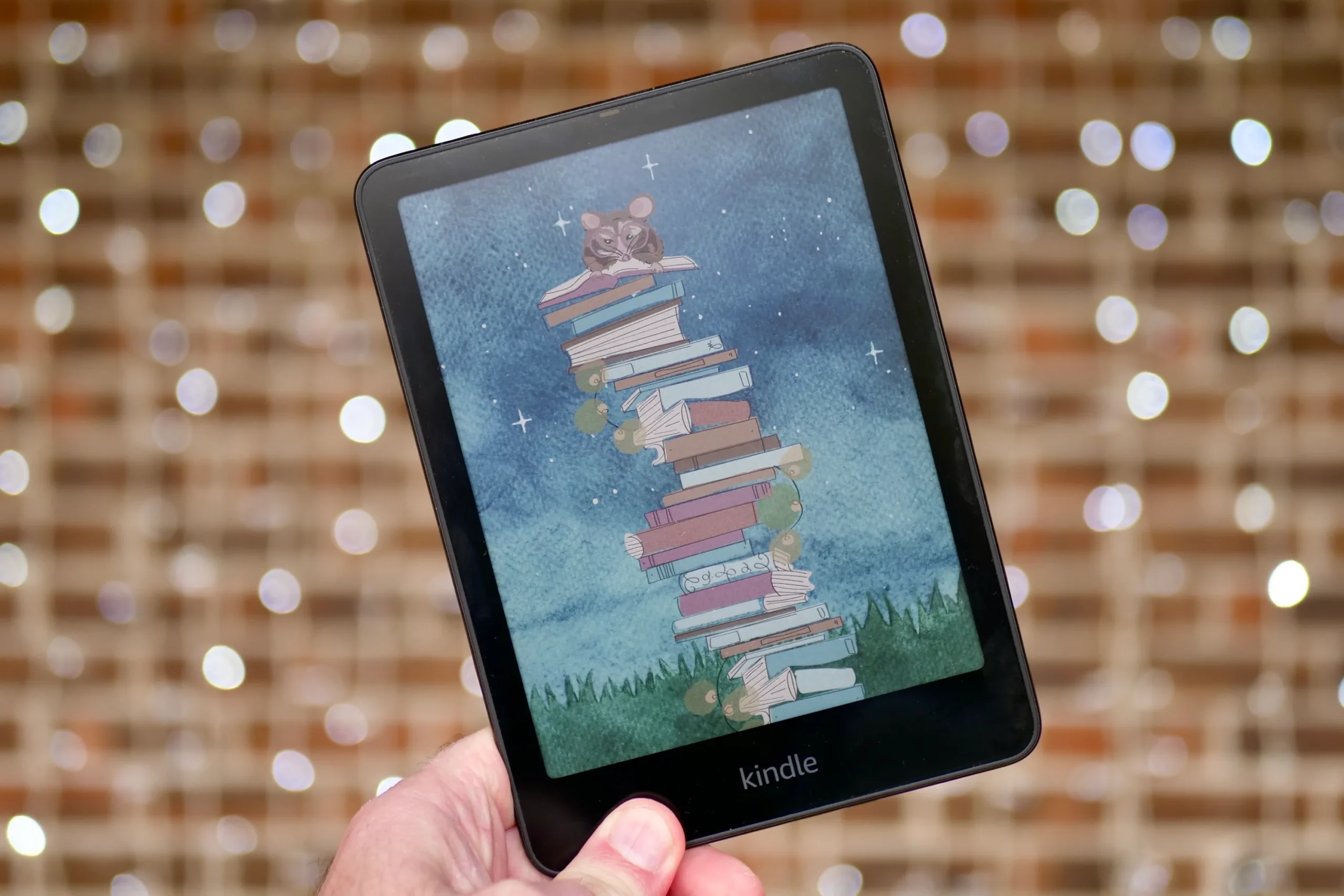
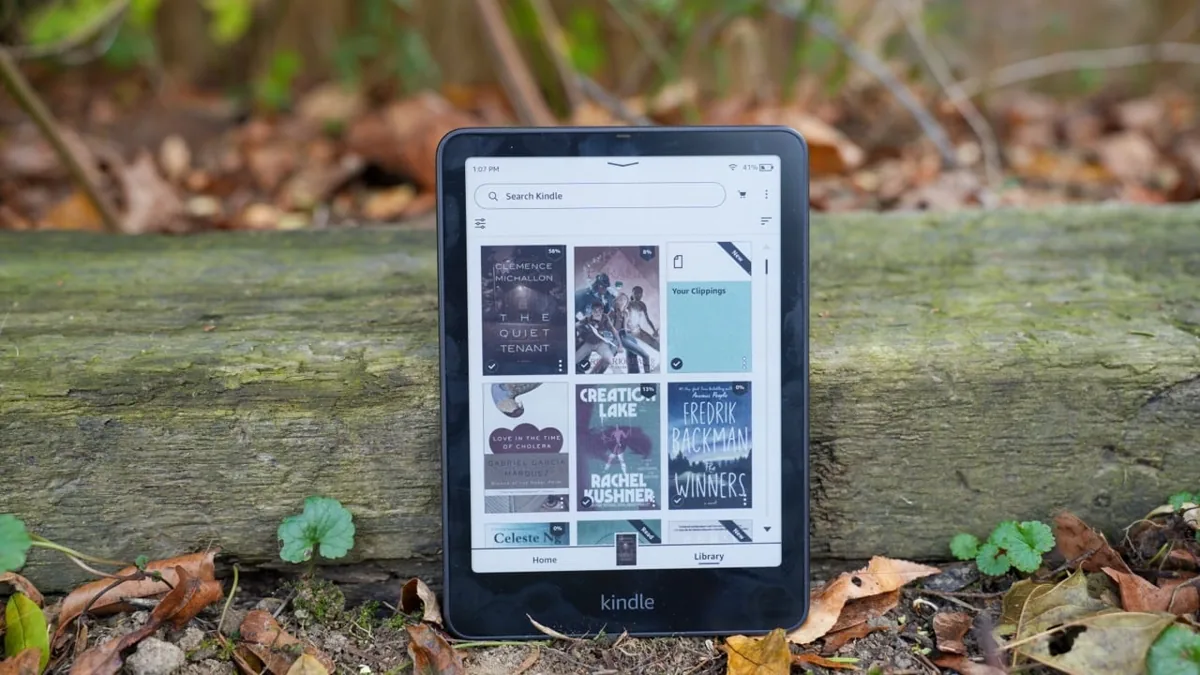
The Kindle Colorsoft shares its body with the Kindle Paperwhite. It is a flat, symmetrical slate with slim bezels on every side. There are no physical buttons anywhere on the front. A single power button and the USB-C port sit on the bottom edge.
This design is simple and familiar to anyone who has owned a Kindle before. It also means every page turn happens by tapping or swiping the touchscreen, which can occasionally lead to accidental screen presses if the device rests on a lap or a table near the bottom edge.
The Signature Edition adds a subtle iridescent Amazon logo on the back and a slightly heavier body due to its wireless charging coil. Amazon has said publicly that it does not plan to add physical buttons to any Kindle for the foreseeable future.
Kobo Libra Colour
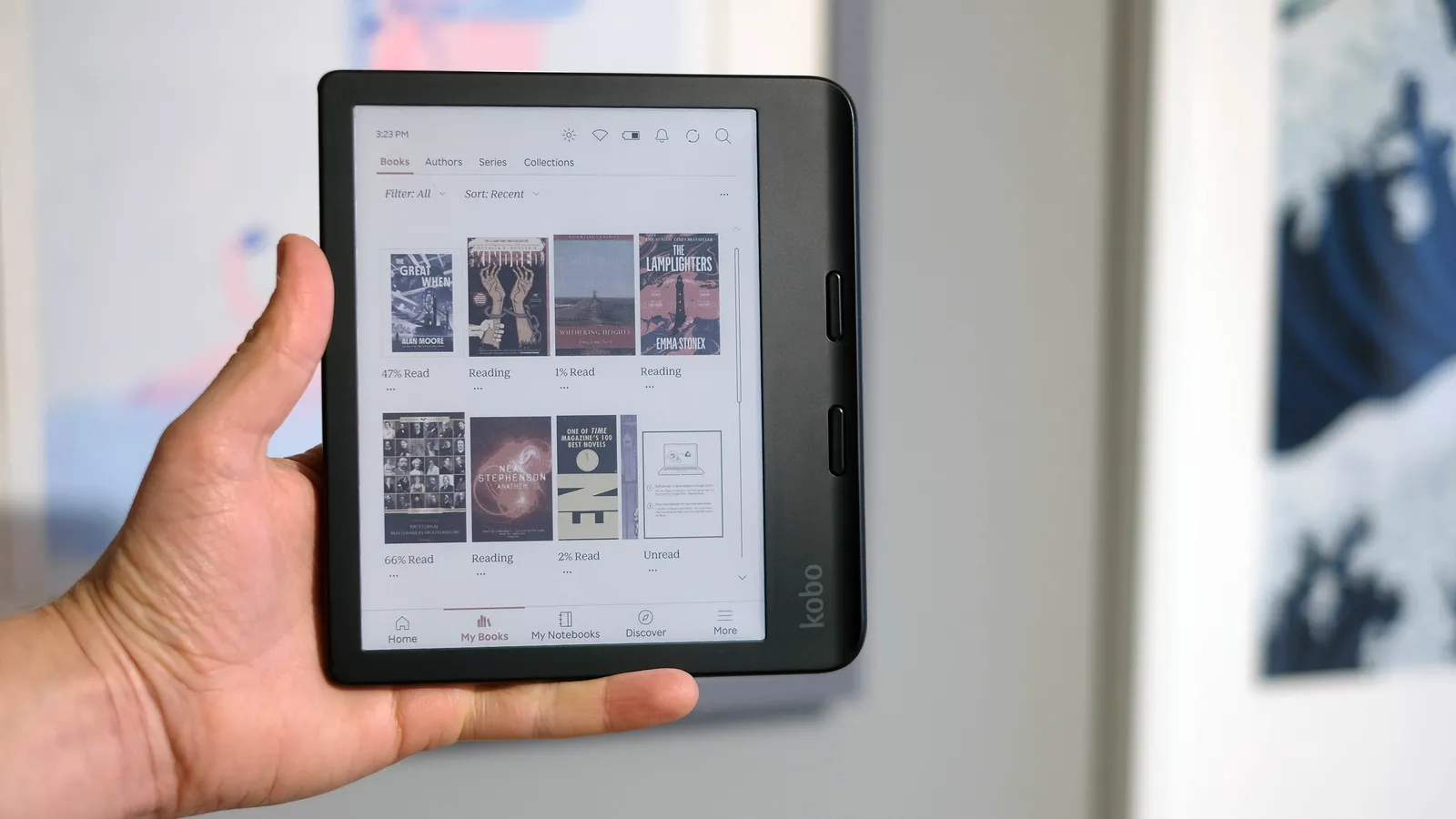
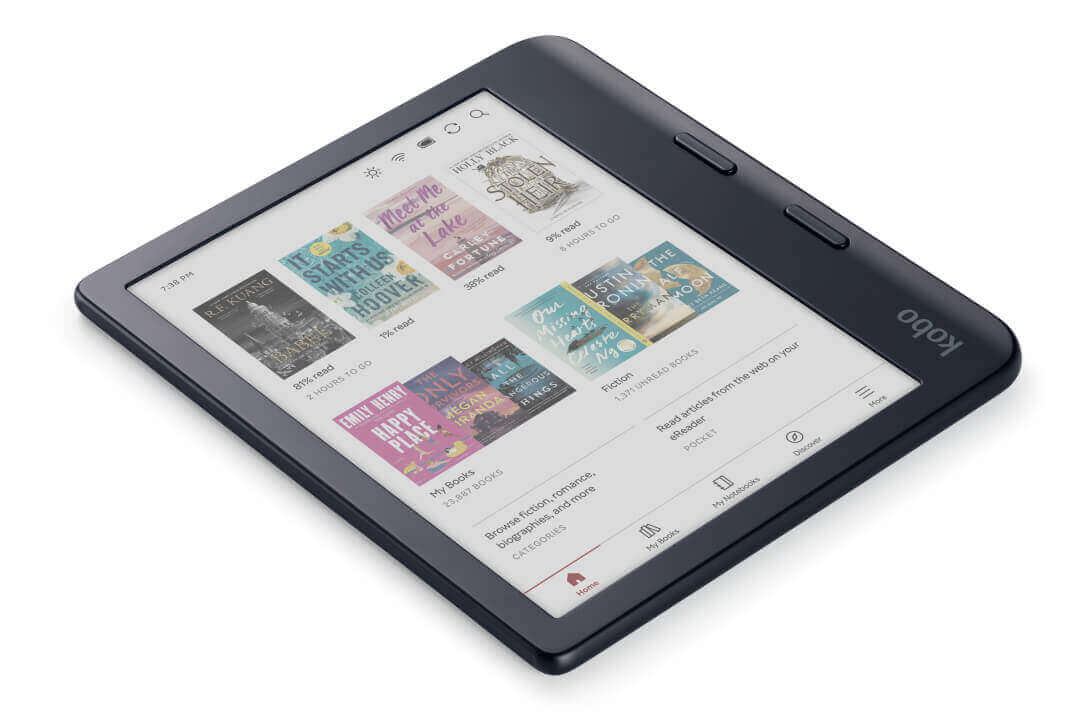
The Kobo Libra Colour uses an asymmetrical design instead, something that is reminiscent of the Kindle Oasis. One side is thicker, giving it a raised grip that houses two physical page-turn buttons. This shape makes the device easier to hold and operate one-handed, especially for readers who prop a book up while eating or commuting.
The back panel uses a mix of recycled and ocean-bound plastic, with a speckled, silver-grey texture that contrasts with the smooth front. It ships in black or a pearly white finish. Kobo also builds the Libra Colour to be more repairable than most e-readers, with replacement batteries and screens available through iFixit.
Verdict
Readers who want a no-frills, phone-like reading slate will feel right at home with the Kindle Colorsoft. Readers who prefer physical buttons, a more ergonomic one-handed grip, and a device designed with repairability in mind should lean toward the Kobo Libra Colour. This is one of the more clear-cut differences between the two devices, and it’s worth handling both in person if possible.
Display Quality
Both e-readers are built around E Ink’s Kaleido 3 panel. Amazon and Kobo have started from the same underlying technology, but have implemented it in noticeably different ways. Understanding both the shared foundation and the differences on top of it helps explain what buyers should actually expect from either screen.
Color E Ink didn’t start with these two devices
It’s worth restating, since it changes how each display should be judged: color E Ink is not a Kindle-era invention, and Kobo was not the one playing catch-up here. E Ink’s first color attempt, called Triton, launched back in 2010, but its low contrast and lack of frontlighting kept it out of the mainstream. The technology that actually caught on, Kaleido, arrived in 2020, and PocketBook and Onyx Boox both built it into e-readers that same year, years before Kobo or Amazon offered anything similar.
Kobo entered the color e-reader market in April 2024, with the Kobo Clara Colour and Kobo Libra Colour as its first-ever color devices, built on the newer Kaleido 3 generation. Amazon didn’t ship a color Kindle until that October. Reuters reported at the time that the Kindle Colorsoft arrived only “following years of effort” inside Amazon to bring a color e-reader to market, well after Kobo, PocketBook, and Onyx Boox had already established the category.
How Kaleido 3 works
A Kaleido 3 panel adds a layer of red, green, and blue color filters on top of a standard black-and-white E Ink film. This is why every color E Ink screen has two resolution numbers: the black-and-white resolution stays sharp at 300 ppi, but color content is filtered down to 150 ppi. Text still looks crisp, but color images and covers look softer than a phone or tablet with conventional screen. This trade-off is a limitation of Kaleido 3 itself, not something either company can fully engineer around.
Kindle’s custom display stack vs. Kobo’s standard Kaleido 3
Both devices use Kaleido 3, but they don’t use it the same way. The Kobo Libra Colour runs what is close to a standard Kaleido 3 module, the same baseline panel used by PocketBook, Onyx Boox, and most other color e-readers, layered with Kobo’s own FastGLR firmware feature to speed up full-page refreshes.
Amazon, by contrast, has said it built a custom display stack for the Kindle Colorsoft rather than using an off-the-shelf Kaleido 3 module, a claim independently confirmed through hands-on reporting from outlets including Engadget and Good e-Reader. The documented changes include:
- An oxide backplane run at 24 driving volts, instead of the more common TFT backplane, intended to move pigments faster and improve contrast.
- Nitride LEDs in the front light, intended to boost color vibrancy and brightness.
- Custom optical coatings and a light guide with micro-deflectors, intended to reduce stray light and color bleed between adjacent pixels.
Amazon says these changes were designed to counteract one of Kaleido 3’s known weaknesses: its color filter layer normally reduces contrast and brightens the background gray compared with a standard black-and-white E Ink panel. The same engineering is also said to speed up page turns and reduce visible flashing when switching between color pages.
In side-by-side testing, Engadget found a real but modest difference: the Kobo Libra Colour’s screen looks slightly warmer than the Kindle Colorsoft’s, a gap that held up even with both devices’ warm-light settings turned all the way down. That same review cautioned that Amazon’s custom engineering, while genuine, is “not as dramatic” in everyday use as Amazon’s marketing suggests, and other testers have noted the Kobo’s text looking very slightly darker and more defined. In short, the Kindle Colorsoft’s hardware is more heavily modified than the Kobo Libra Colour’s, but the practical, page-to-page difference for most readers is small.
Other real-world differences
- Refresh speed and ghosting. Both devices refresh the full page periodically to clear ghosting (the faint outline of a previous page). Color pages take a bit longer to redraw than plain text pages on both devices, which is normal for Kaleido 3 hardware rather than a flaw unique to either brand.
- Outdoor readability. Both screens are glare-free and read comfortably in direct sunlight, a major advantage over any backlit tablet.
- Night reading. Both devices offer adjustable warm lighting. The Kindle Colorsoft Signature Edition automatically adjusts brightness and color temperature based on ambient light, while the base 16 GB Kindle Colorsoft and the Kobo Libra Colour require manual adjustment through onscreen sliders.
The Kindle Colorsoft’s early yellow-tint issue
It would be worth noting for anyone comparing reviews from different years that the early Kindle Colorsoft units sold in late 2024 had a visible yellow band near the bottom of the screen. Industry analysis at the time traced the cause to a change in the optically clear adhesive Amazon used as part of its custom display stack, the same engineering discussed above. Amazon paused shipments, offered replacements, and adjusted its manufacturing process. Devices sold since early 2025 largely resolve this issue, though a small number of buyers have still reported a slightly warmer frontlight tone compared to Amazon’s monochrome Kindles. Anyone buying a Colorsoft today should be getting a corrected unit, but it’s a reasonable thing to check for during the return window. The Kobo Libra Colour’s more standard Kaleido 3 implementation has not had a comparable widely reported defect.
Key Takeaway: Amazon was one of the last major e-reader makers to ship a color device, arriving about six months after Kobo and roughly four years after PocketBook and Onyx Boox. Once it did, Amazon chose to re-engineer the Kaleido 3 panel rather than use it as-is, aiming for more contrast at the cost of a rockier launch. Kobo’s more standard implementation renders slightly warmer and, according to some testers, very slightly sharper text. Neither approach is dramatically better in daily reading, so display alone should not decide this purchase.
Reading Experience
Reading books, rather than staring at spec sheets, is what actually separates a good e-reader from a mediocre one.
Font and layout customization
Both devices let readers adjust font size, line spacing, margins, and text alignment. The Kobo Libra Colour goes further, letting readers customize which controls appear on its Home screen and adjust more granular layout options. The Kindle Colorsoft’s customization is more limited, sticking to font, size, boldness, margins, and alignment without deeper menu customization.
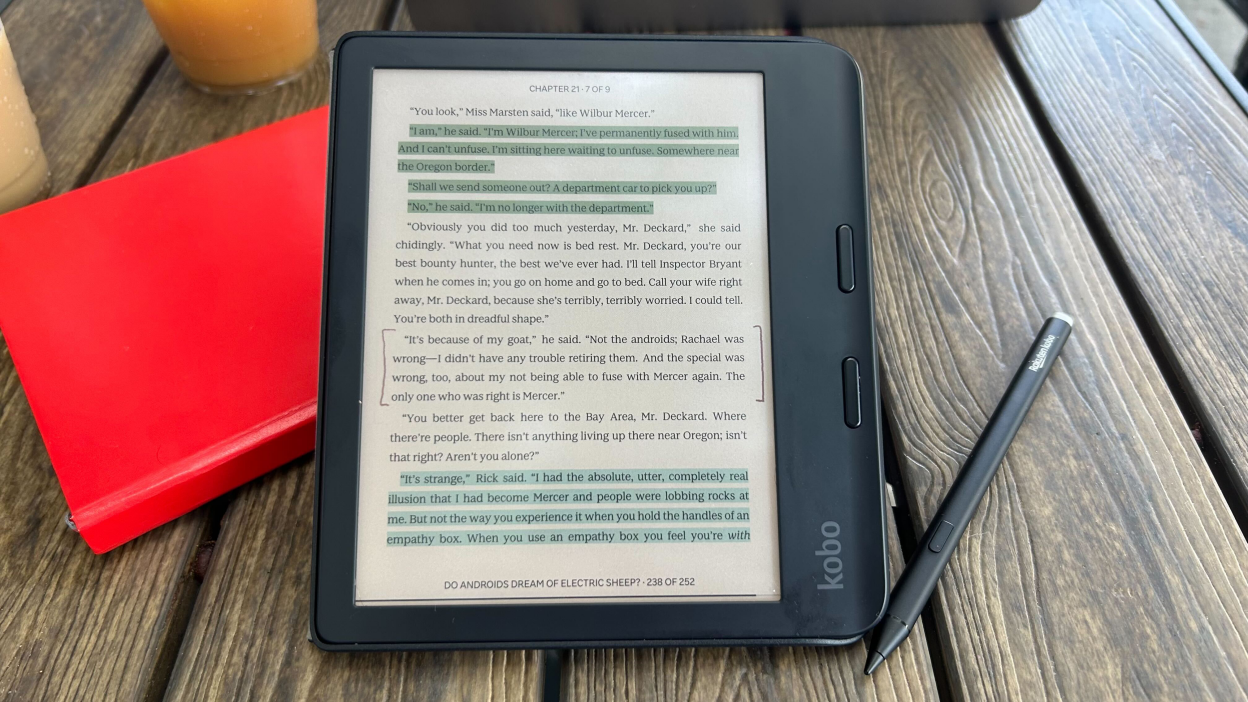
Highlighting and annotation
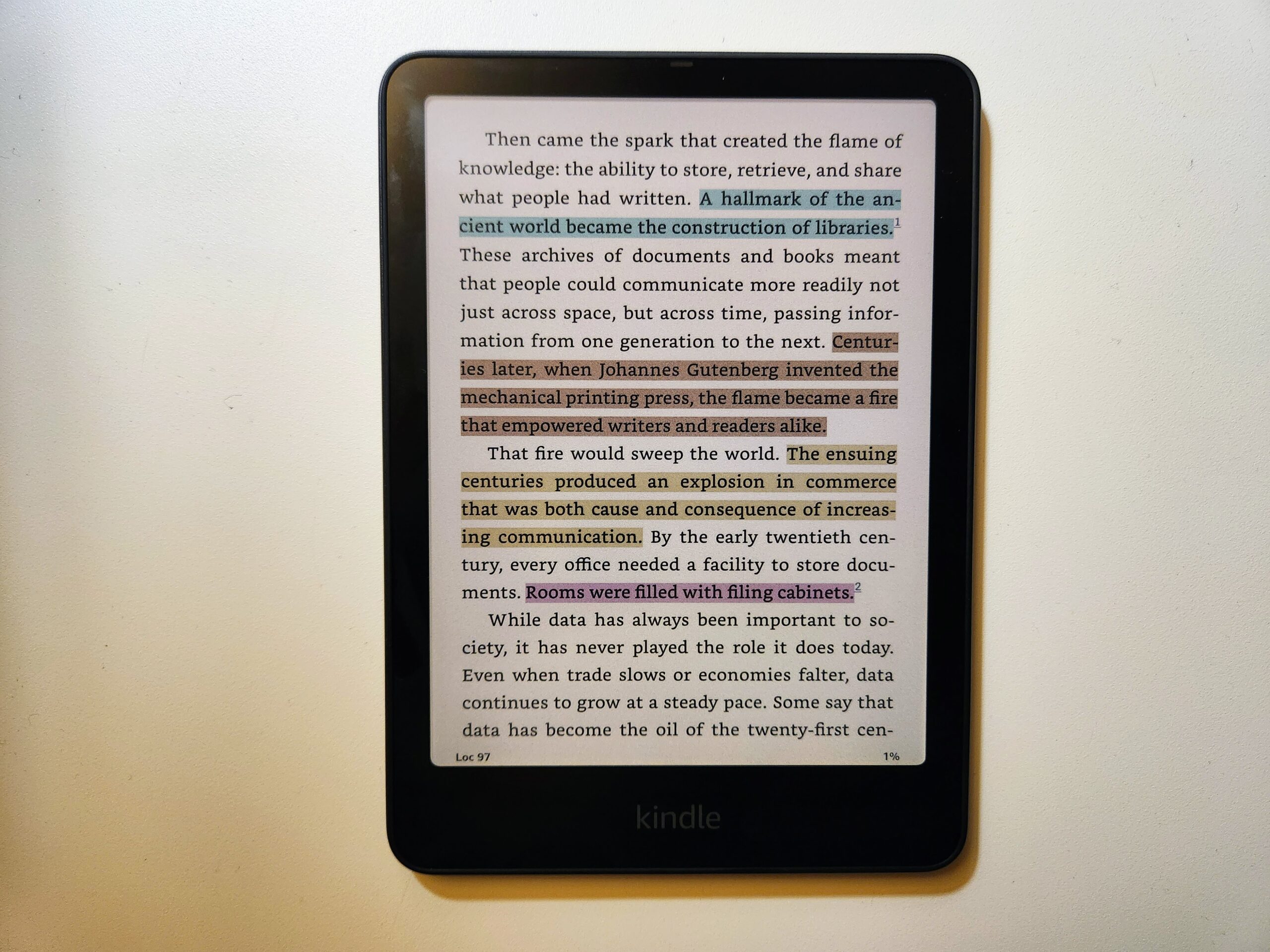
Both devices support tapping and dragging to highlight text in multiple colors, which is one of the most useful upgrades that color E Ink brings to reading. Readers can now color-code highlights (for example, yellow for favorite quotes, pink for themes to revisit) instead of relying on a single highlight shade.
Dictionary, translation, and reference tools
Both devices include an offline dictionary that appears with a simple press-and-hold gesture. Amazon’s Kindle also includes:
- X-Ray, which shows background information about characters, places, and terms in supported books.
- Word Wise, which shows short definitions above difficult words, which is aimed at newer or younger readers.
- Instant Translations for select languages.
Kobo’s equivalent reference tools are more basic, focused mainly on dictionary lookups, though the Kobo Libra Colour supports a wider range of third-party dictionary files that can be sideloaded manually.
New AI reading tools
Amazon has begun rolling out two AI-assisted reading features across 2025 and 2026: Story So Far, which offers a spoiler-free recap of a book up to the reader’s current page, and Ask This Book, which lets readers highlight a passage and ask a question about it without revealing what happens later in the story. Both features started on the Kindle iOS app and are being extended to Kindle e-reader hardware through 2026, though availability still varies by title and region.
Kobo has announced its own AI-powered recap feature for the Kobo app, with a stated commitment to keep recaps short, avoid permanently storing summary data, and let authors opt out. As of this writing, Kobo’s version is newer and less widely rolled out than Amazon’s.
Reading stats and accessibility
Both brands track basic reading stats, such as time spent reading and average reading speed, though neither offers especially deep reading history tools compared to third-party apps. Kindle’s version, called ‘Reading Insights’, adds reading streaks and monthly activity, though full details are currently limited to U.S. accounts. Kobo’s on-device Reading Stats are simpler, showing session length and pages per minute.
For accessibility, Amazon offers a Bluetooth-based screen reader (marketed as Assistive Reader) aimed at readers with vision disorders, while Kobo has rolled out an optional screen reader and larger system text sizes, currently limited to European Union customers. Neither company markets its e-reader hardware as a full replacement for a dedicated accessibility device, so readers with significant vision needs should look closely at each company’s support documentation before buying.
Key Takeaway: Kindle wins on built-in reference tools like X-Ray and Word Wise, and its new AI recap features are ahead of Kobo’s equivalent. Kobo wins on interface customization and file flexibility. Casual fiction readers will likely appreciate Kindle’s extras; readers who like to tinker with their setup may prefer Kobo’s openness.
Color Content Performance
Color is the entire reason to buy either of these devices over a black-and-white Kindle or Kobo, so it’s worth breaking down how each one handles different types of color content.
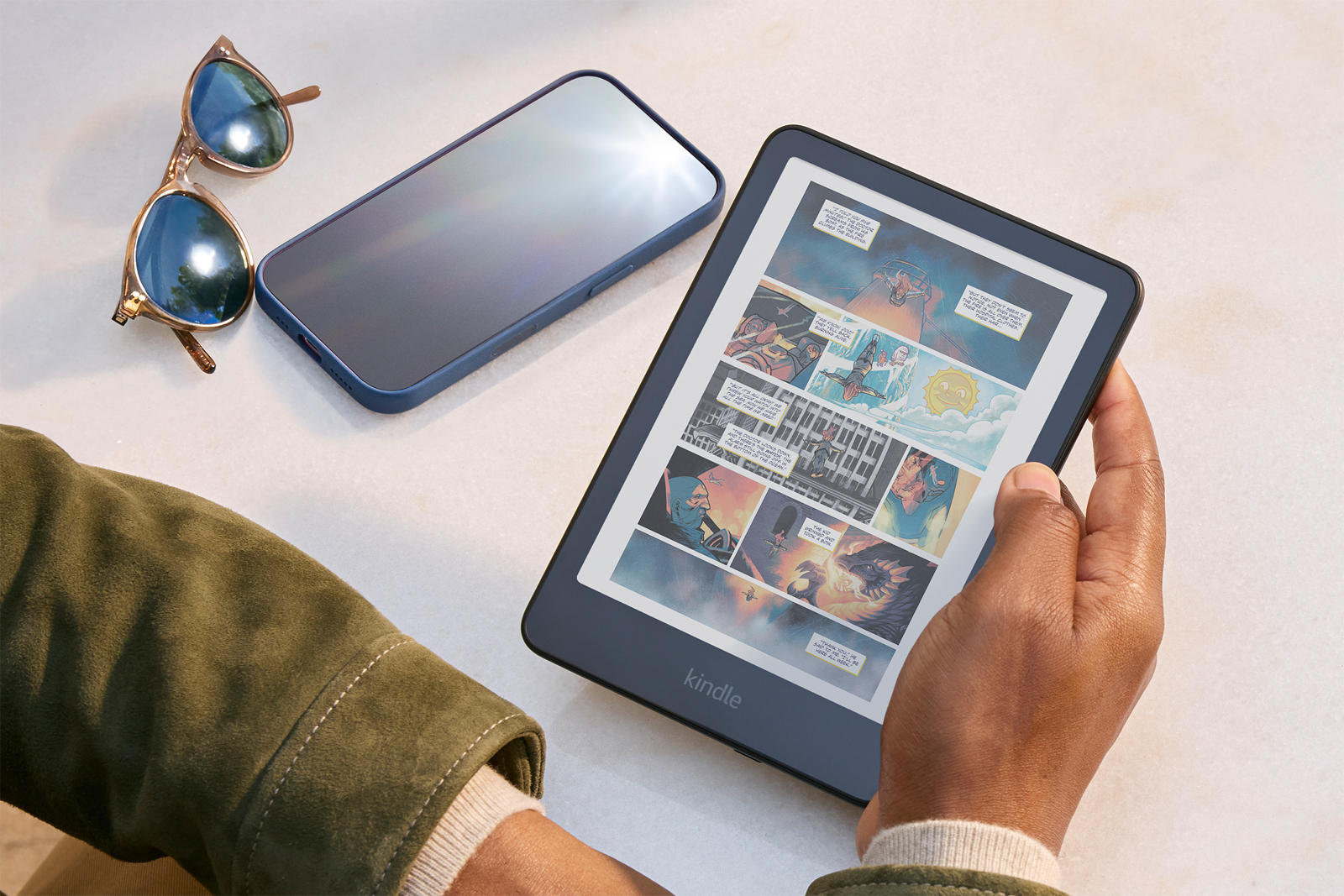
- Comics and graphic novels: Both devices display comic panels clearly, with saturated (if slightly soft) colors. Because both share the same 150 ppi color resolution, comic performance is essentially tied.
- Manga: Most manga is printed in black and white, which plays to both devices’ strength: sharp 300 ppi text and linework. Neither device adds meaningful benefit over a monochrome e-reader for typical manga, though color covers and any colored bonus pages do look noticeably better than on a grayscale screen.
- Children’s books: Illustrated children’s books benefit from color, though the 150 ppi ceiling means fine details in busy illustrations can look a little flat compared to a tablet or printed book.
- Magazines: Neither device is an ideal magazine reader. Photo-heavy layouts and small captions can be difficult to read at this resolution, and neither Kindle nor Kobo has a magazine-specific reading mode built for this display type.
- Textbooks and illustrated non-fiction: Diagrams, charts, and maps read well in color, which is a genuine upgrade for textbook and reference use. The Kobo Libra Colour’s broader native PDF handling (detailed below) makes it somewhat friendlier for textbook PDFs specifically.
- Cookbooks: Photos of finished dishes look correct in tone but soft in detail, a limitation of Kaleido 3 rather than either brand’s implementation.
Key Takeaway: For Kindle vs Kobo for comics or manga, the two devices are close enough in raw display performance that ecosystem and file support matter more than picture quality. Readers focused on manga specifically should weigh format support and library access over color quality.
Performance
Everyday responsiveness matters as much as any single spec.
- Page turns: Testing has found the Kindle Colorsoft’s page turns slightly faster than the Kobo Libra Colour’s, though the difference is small enough that most readers won’t notice it without a side-by-side comparison.
- Startup and wake time: Both devices wake quickly from sleep, typically in under a second, and both take a few seconds to fully boot from a cold start.
- Opening large files: Large PDFs and image-heavy books load a bit more slowly on both devices, since neither ships with a particularly powerful processor. This is a category where color e-readers generally lag behind faster tablets.
- Menu navigation: The Kobo interface allows more customization of its Home screen and navigation shortcuts, while Kindle’s menu system is simpler and more locked down.
- Firmware stability: Both platforms receive periodic firmware updates. Kobo has occasionally shipped updates with rollout bugs (including a widely reported boot-loop issue tied to a 2025 update), while Amazon has been criticized for slower feature rollouts to its e-reader hardware compared to its phone apps.
Software and User Interface
Kindle’s operating system
Kindle’s interface is built around simplicity. The Home screen shows recent books, recommendations, and a search bar. Organization tools include Collections (Amazon’s version of folders) and basic sorting by author, title, or recent activity. Everything, from purchases to library syncing, happens automatically in the background through Amazon’s cloud.
Kobo’s operating system
Kobo’s interface offers more visible customization. Readers can rearrange which tiles appear on the Home screen, adjust the “tap zone” used to bring up the reading menu, and access more granular library sorting and shelving tools, similar to a personal folder system. It takes a little more setup, but rewards readers who like a personalized layout.
Recommendations and library management
Amazon’s recommendation engine benefits from a much larger sales and reading dataset, so its “customers also bought” and personalized suggestions tend to be more accurate. Kobo’s discovery tools are less refined, though its interface makes manual browsing and organizing a personal library somewhat easier.
Search and syncing
Both platforms sync reading position, bookmarks, and highlights across devices and apps. Kindle’s search works within Amazon’s entire catalog and personal library simultaneously; Kobo’s search is competent but less unified across its store and OverDrive-borrowed content.
Key Takeaway: Kindle software favors readers who want things to “just work” with minimal setup. Kobo software favors readers who like to organize and personalize their reading environment.
Ecosystem Comparison
This is where the long-term differences between Kindle and Kobo really show up, and it’s arguably more important than any single hardware spec.
Bookstores
The Kindle Store carries more than 15 million titles, which makes it a considerably larger catalog than the Kobo Store. Amazon’s dominance in publishing deals also means new releases and exclusive titles are more likely to show up first on Amazon, or only, on Kindle.
Subscription services
- Kindle Unlimited costs $11.99 a month in the U.S., includes roughly 4 million titles, and allows up to 20 borrowed books at a time.
- Kobo Plus is split into three tiers: Kobo Plus Read (e-books only) at $7.99 a month, Kobo Plus Listen (audiobooks only) at $7.99 a month, and a combined Read & Listen plan at $9.99 a month.
Kobo Plus is cheaper and more flexible for readers who only want e-books or only want audiobooks. Kindle Unlimited is pricier but has a larger catalog and works across every Amazon device and app a reader owns.
Audiobooks
Kindle Colorsoft owners can pair Bluetooth headphones to listen to Audible audiobooks, though this feature is only available in select countries due to licensing. Kobo Libra Colour owners can do the same with Kobo Audiobooks, and can access Kobo Plus Listen for unlimited listening. Audible’s catalog is significantly larger than Kobo’s audiobook selection.
Library borrowing
Both devices support OverDrive and Libby for borrowing e-books from public libraries, one of the most valuable features either platform offers. As of mid-2025, OverDrive limited Kobo devices to a single linked library card at a time, a restriction that does not apply to the Libby mobile app. Kindle’s library borrowing works through the same Libby-to-Kindle handoff process most U.S. library patrons are already familiar with.
Read-it-later and cloud storage
Kobo integrates directly with Google Drive and Dropbox for cloud file access, and replaced its previous Pocket integration with Instapaper in 2025 after Pocket shut down. Kindle has no built-in read-it-later service and relies on the more manual ‘Send to Kindle’ tool for moving outside documents onto the device.
Reading trackers
Kobo has added native StoryGraph integration, letting readers automatically sync reading data to their StoryGraph account, a feature increasingly popular with readers who have moved away from Goodreads. Kindle has no equivalent native integration with StoryGraph or similar third-party tracking apps.
Key Takeaway: Kindle wins decisively on catalog size and audiobook selection. Kobo wins on subscription flexibility, cloud storage integration, and third-party reading-tracker support. Buyers already deep into Kindle Unlimited or Audible should think carefully before switching platforms, since neither library transfers to the other.
File Format Support
This is one of the clearest differences between the two ecosystems.
| Format | Kindle Colorsoft | Kobo Libra Colour |
|---|---|---|
| AZW / AZW3 / KFX | Native | Not supported |
| EPUB / EPUB3 | Converts automatically via Send to Kindle | Native |
| MOBI | Native (legacy) | Native |
| Native | Native | |
| CBZ / CBR (comics) | Not natively supported | Native |
| TXT / RTF / HTML | Supported via Send to Kindle | Native |
| DOC / DOCX | Supported via Send to Kindle | Not natively supported |
| Image files (JPEG, PNG, GIF, BMP, TIFF) | Limited | Native |
Amazon’s ecosystem is built around its own proprietary formats. Sideloading an EPUB directly onto a Kindle Colorsoft is not possible; readers instead use the free ‘Send to Kindle’ service, which converts the file automatically. As of January 2026, Amazon also began letting verified buyers download certain DRM-free Kindle Direct Publishing titles as standalone EPUB or PDF files, but this only applies to books an author or publisher has specifically opted into, and it does not apply to Kindle Unlimited borrows or most traditionally published titles.
Kobo’s ecosystem was built around open formats from the beginning. EPUB, the most widely used e-book format outside Amazon, works natively without any conversion. This makes the Kobo Libra Colour considerably more flexible for readers who buy e-books from independent bookstores, borrow from libraries in EPUB format, or download public-domain books from sites like Project Gutenberg. It also natively handles CBZ and CBR files, the standard formats for scanned comics and manga, without any workaround.
Key Takeaway: For Kindle vs Kobo for PDFs, both devices handle PDFs reasonably well natively, though Kobo’s larger native format list makes it the more flexible all-around file reader. Readers who exclusively buy from the Kindle Store won’t notice this limitation day to day, but anyone who reads from multiple sources will feel Kobo’s openness quickly.
Battery Life
Both devices are built for weeks of reading rather than days, though manufacturer estimates and real-world use don’t always match exactly.
- Manufacturer claims: Amazon rates the Kindle Colorsoft at up to 8 weeks of battery life. Kobo rates the Libra Colour at up to 6 weeks, based on 30 minutes of reading per day with the frontlight at 30% brightness and wireless radios off.
- Realistic usage: Battery life on both devices drops noticeably with heavier daily reading, more frontlight brightness, and more time spent with Wi-Fi or Bluetooth active. Expect real-world battery life closer to 3-5 weeks under typical daily use on either device, rather than the maximum manufacturer estimate.
- Charging speed: Both devices charge over USB-C. The Kindle Colorsoft Signature Edition supports optional wireless charging through a separate dock, along with a modest quick-charge boost when plugged in. The base 16 GB Kindle Colorsoft and the Kobo Libra Colour both rely on standard USB-C charging only.
- Power-saving features: Both devices support airplane mode and let readers disable Wi-Fi and Bluetooth to extend battery life significantly between charging sessions.
Key Takeaway: Neither device will leave a typical reader stranded without power. The Kindle Colorsoft has a modest edge in manufacturer-estimated battery life and the convenience of optional wireless charging, but the difference in practice is unlikely to be the deciding factor for most buyers.
Note-Taking and Productivity
This is the single biggest functional gap between these two devices, and it deserves its own section.
The Kobo Libra Colour supports the Kobo Stylus 2, which is sold separately for $69.99. With the stylus connected, readers can:
- Write handwritten annotations directly on e-book pages
- Mark up PDFs with handwritten notes
- Use a basic Notebook app for free-form writing and sketching
- Highlight and annotate in multiple colors
The Kobo Libra Colour’s Notebook features are useful for short annotations, quick sketches, and marking up documents, but the device was not built primarily as a writing tablet. Reviewers have noted that longer handwriting sessions can feel cramped on a 7-inch screen.
The Kindle Colorsoft has no stylus support at all. This is a common point of confusion, since Amazon also sells the Kindle Scribe Colorsoft, an entirely different 11-inch device built specifically for handwriting, complete with a bundled pen. It is priced higher (starting around $429.99 to $629.99 depending on storage), and comes with dedicated AI note-search tools. The 7-inch Kindle Colorsoft covered in this guide shares none of that hardware or software.
For anyone who genuinely wants to take handwritten notes, highlight PDFs by hand, or sketch, the choice is straightforward:
- The Kobo Libra Colour offers basic stylus functionality built into an otherwise ordinary e-reader.
- The Kindle Colorsoft offers none, and buyers who want Kindle-brand note-taking would need to spend significantly more on a Kindle Scribe Colorsoft instead.
Key Takeaway: Readers who want any note-taking capability at all should choose the Kobo Libra Colour. Readers who have no interest in handwriting on their e-reader will not miss this feature on the Kindle Colorsoft.
Price and Value
| Kindle Colorsoft | Kobo Libra Colour | |
|---|---|---|
| Entry price | $249.99 (16 GB, no auto-brightness or wireless charging) | $259.99 (32 GB, list price as of mid-2026) |
| Higher tier | $279.99 (32 GB Signature Edition, auto-brightness + wireless charging) | Not applicable; one configuration |
| Typical sale price | As low as $160-$200 during major sales events | As low as $199.99-$229.99 during Kobo promotions |
| Required accessories | None for basic reading | Kobo Stylus 2 ($69.99) if note-taking matters |
| Ongoing subscription cost | Kindle Unlimited, $11.99/month (optional) | Kobo Plus, $7.99-$9.99/month (optional) |
Kobo raised the Libra Colour’s price twice since its 2024 debut, most recently in May 2026, pushing its list price above where it sat for most of its first two years on the market. That price hike, combined with steady Kindle Colorsoft discounts, has narrowed what used to be a clear price advantage for Kobo. Buyers comparing list prices today may find the two devices closer in cost than older reviews suggest, so it’s worth checking current pricing on both storefronts before deciding.
Long-term value depends heavily on subscription habits. A reader who commits to Kindle Unlimited for years will spend more per month than a Kobo Plus subscriber, but gains access to a considerably larger catalog. A reader who buys books individually, rather than subscribing, may find Kobo’s Store pricing and periodic sales competitive with Amazon’s.
Key Takeaway: Is the Kindle Colorsoft worth it? For readers already inside Amazon’s ecosystem, yes, especially at sale pricing. Is the Kobo Libra Colour worth buying? Yes, particularly for readers who value the stylus, open file formats, or a cheaper subscription, though its recent price increases make it less of an automatic budget pick than it once was.
Pros and Cons
Kindle Colorsoft
Pros
- Massive 15-million-title Kindle Store
- Kindle Unlimited offers the largest e-book subscription catalog available
- Slightly faster page turns in testing
- Auto-adjusting brightness and wireless charging (Signature Edition)
- Built-in X-Ray, Word Wise, and expanding AI recap features
- Frequent, steep discounts during Amazon sales events
Cons
- No physical page-turn buttons
- No stylus support at any price tier of this specific model
- Locked into Amazon’s proprietary formats; EPUB requires conversion
- Early units had a well-documented yellow-tint display issue
- Audible playback restricted in some countries
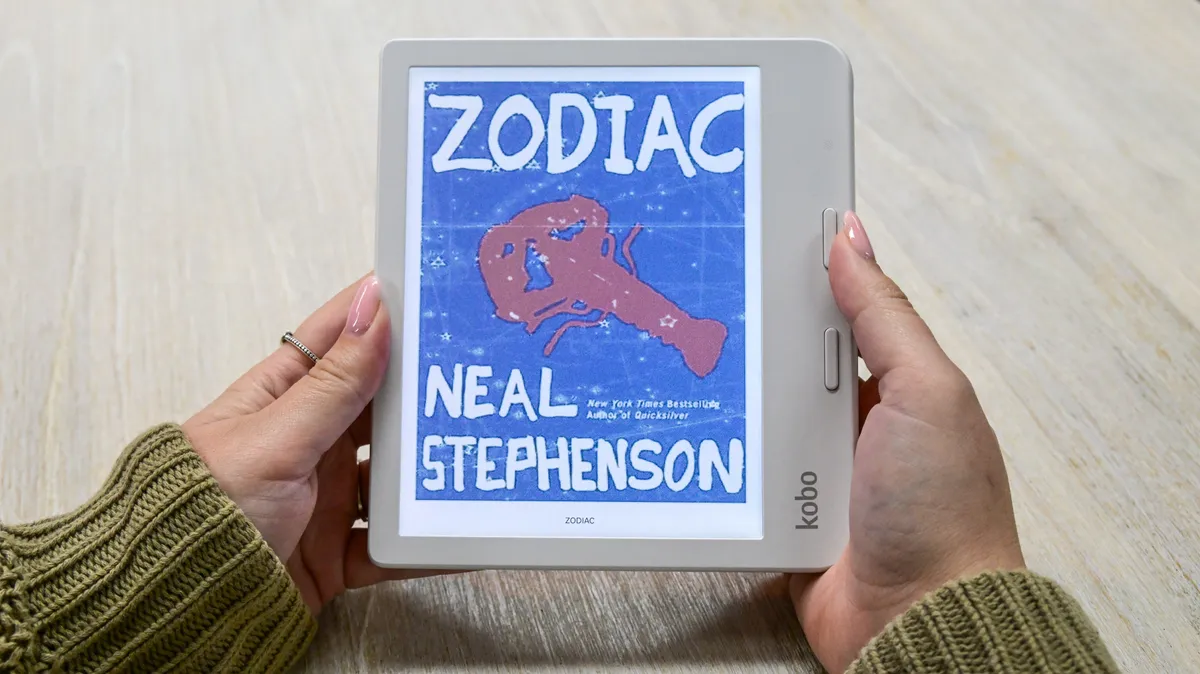
Kobo Libra Colour
Pros
- Physical page-turn buttons and a more ergonomic one-handed grip
- Kobo Stylus 2 support for basic handwritten notes and annotations
- Native EPUB, CBZ, and CBR support with no file conversion
- Cheaper, more flexible Kobo Plus subscription tiers
- Google Drive, Dropbox, Instapaper, and StoryGraph integration
- More repairable design with user-replaceable parts
Cons
- Smaller bookstore catalog than Amazon’s
- Two price increases since 2024 have eroded its earlier value advantage
- Kobo Stylus 2 is sold separately and priced at a premium
- OverDrive limits Kobo devices to a single library card
- Smaller audiobook catalog than Audible
Who Should Buy the Kindle Colorsoft?
The Kindle Colorsoft makes the most sense for readers who are already using Kindle Unlimited, own other Kindle devices, or buy most of their books directly from Amazon. It also suits readers who want the simplest possible device: no buttons to learn, no stylus to manage, and an interface that mirrors every other Kindle they may have owned before. Readers focused mainly on comics, cover art, and casual fiction, without a strong need for handwriting or open file formats, will likely be happiest here.
Who Should Buy the Kobo Libra Colour?
The Kobo Libra Colour fits readers who want more control over their reading device: physical buttons, a stylus for light note-taking, and the freedom to read EPUB and library files without conversion. It’s a strong pick for readers who borrow heavily from libraries, read content from multiple bookstores, or specifically want to escape a single company’s ecosystem. Students marking up PDFs, travelers who prefer one-handed page turns, and readers who already use apps like StoryGraph will get more out of Kobo’s extra flexibility.
Head-to-Head Verdict
| Category | Winner | Why |
|---|---|---|
| Reading books | Tie | Both offer comparable font tools and screen quality |
| Comics | Tie | Identical 150 ppi color resolution on both |
| Magazines | Tie | Neither handles photo-heavy layouts especially well |
| PDFs | Kobo Libra Colour | Native PDF and file handling without conversion |
| Note-taking | Kobo Libra Colour | Kindle Colorsoft has no stylus support |
| Software | Tie | Kindle is simpler; Kobo is more customizable |
| Ecosystem | Kindle Colorsoft | Larger store, bigger audiobook catalog |
| Battery life | Kindle Colorsoft | Higher manufacturer estimate, optional wireless charging |
| Portability | Kobo Libra Colour | Lighter weight and one-handed button grip |
| Value | Tie | Price gap has narrowed after Kobo’s 2026 price increases |
Frequently Asked Questions
Which has the better display, Kindle Colorsoft or Kobo Libra Colour? Both use the same E Ink Kaleido 3 panel at the same resolution. The Kobo Libra Colour has a very slight edge in text contrast, while the Kindle Colorsoft Signature Edition offers automatic brightness adjustment that Kobo’s device lacks.
Which is better for comics, Kindle or Kobo? Both display comics equally well, since they share the same 150 ppi color resolution. The bigger difference is file support: Kobo natively reads CBZ and CBR comic files, while Kindle does not.
Which is better for manga? Neither device offers a meaningful display advantage for typical black-and-white manga. Kobo’s native CBZ/CBR support makes it slightly more convenient for readers who download scanned manga files.
Can both read PDFs? Yes, both devices support PDFs natively. The Kobo Libra Colour’s broader file format support makes it a bit more flexible for heavily formatted PDFs and textbooks.
Which device supports library borrowing better? Both work with OverDrive and Libby. Kobo limits devices to a single linked library card, while Kindle’s library-borrowing flow through Libby is generally considered more seamless for U.S. readers.
Does either device have a stylus? Only the Kobo Libra Colour does, through the separately sold Kobo Stylus 2. The Kindle Colorsoft has no stylus support; Amazon’s stylus-enabled device is the separate, more expensive Kindle Scribe Colorsoft.
Which is easier to use for a first-time e-reader owner? The Kindle Colorsoft’s simpler, button-free design and tighter integration with Amazon accounts make it slightly easier for total beginners, especially anyone who already shops on Amazon.
Which offers better value overall? It depends on subscription habits. Kindle Unlimited costs more but has a larger catalog. Kobo Plus is cheaper and more flexible. Kobo’s 2026 price increases have also narrowed its earlier hardware price advantage.
Which is better for students? The Kobo Libra Colour’s stylus support and native PDF handling make it more useful for marking up course readings and textbooks, though neither device is a substitute for a dedicated note-taking tablet like the Kindle Scribe Colorsoft or a Kobo Elipsa.
Which has the stronger ecosystem? Amazon’s Kindle Store and Kindle Unlimited catalog are both considerably larger than Kobo’s equivalents. Kobo counters with more flexible subscription tiers and better third-party integrations, like Google Drive, Dropbox, and StoryGraph.
Is the Kindle Colorsoft worth it in 2026? For readers already committed to Kindle Unlimited or Amazon’s bookstore, yes, particularly during sale pricing. Readers without any Amazon ecosystem investment should weigh Kobo’s openness before committing.
Is the Kobo Libra Colour worth buying after its 2026 price increases? It still offers real advantages, like stylus support, native EPUB and PDF handling, and cheaper subscription options, but it is no longer the clear budget pick it was at launch. Buyers should compare current prices on both devices before deciding.
What is the best color e-reader alternative to these two? Readers who want a Kindle Colorsoft alternative with a larger screen and full note-taking should look at the Kindle Scribe Colorsoft. Readers who want a smaller, cheaper Kobo option can consider the Kobo Clara Colour, which uses the same display technology in a 6-inch body.
Do either of these e-readers strain the eyes less than a tablet? E Ink displays generally cause less eye strain than backlit LCD or OLED tablet screens for extended reading, since they don’t emit the same level of blue light and rely on reflected light like a printed page. Individual experiences vary, and anyone with ongoing eye strain or headaches should consult an eye care professional rather than relying on device marketing alone.
Can Kindle and Kobo libraries be transferred between devices? No. Books purchased through the Kindle Store are tied to Amazon’s account system and DRM, and books purchased through the Kobo Store are tied to Kobo’s account system. Neither library transfers directly to the other platform, which is worth considering before committing to either ecosystem long-term.
Final Recommendation
There is no universal winner between the Kindle Colorsoft and the Kobo Libra Colour. The right choice depends on existing habits and priorities more than any single spec.
- Kindle users and Amazon Prime members should stay with the Kindle Colorsoft. Switching ecosystems means losing access to a Kindle Unlimited library and any previously purchased Kindle books.
- Kobo users already invested in the Kobo Store or Kobo Plus should stick with the Libra Colour for the same reason.
- First-time e-reader buyers with no existing e-book library should base their decision on physical preferences: buttons and a stylus favor Kobo, while a simpler, button-free design favors Kindle.
- Comic and manga readers will find similar display quality on both, so file format support and existing digital comic libraries should guide the decision.
- Students who plan to annotate PDFs or take notes should lean toward the Kobo Libra Colour.
- Travelers who want one-handed reading with physical buttons will likely prefer the Kobo Libra Colour’s ergonomic grip.
- Casual readers who mainly want fiction, comics, and simplicity will be well served by either device, though Kindle’s larger catalog and recommendation engine give it a slight edge for pure discovery.
- Heavy readers who read across multiple platforms and formats will appreciate Kobo’s open file support and lower subscription cost.
- Readers deeply invested in Amazon’s ecosystem should buy the Kindle Colorsoft without hesitation.
- Readers who want more openness and file flexibility should buy the Kobo Libra Colour, understanding that its price has crept closer to Kindle’s over the past two years.
Check Latest Deals on the Kindle Colorsoft
Check Latest Deals on the Kindle Colorsoft Signature Edition
Check Latest Deals on the Kindle Colorsoft Kids
Check Latest Deals on the Kobo Libra Colour
Both devices represent real progress for color E Ink. Both are worth considering over an older black-and-white e-reader if color content, like comics, illustrated books, or color-coded highlighting, genuinely matters to how someone reads. The decision ultimately comes down to which company already holds a reader’s library, and how much they value buttons, a stylus, and open formats over Amazon’s larger catalog and simpler design.